RoostGPT Command Line Interface (CLI)
Run RoostGPT entirely from your terminal — no hosted instance required. Configure it via a .env file and generate tests locally or from any CI/CD pipeline.
Available for macOS, Windows, and Linux.
Binary releases: github.com/roost-io/roost-support/releases
Step 1: Install the CLI
macOS / Linux
curl https://raw.githubusercontent.com/roost-io/roost-support/master/roostgpt.sh | sudo bash -
Windows
Download roostgpt-win.exe and add it to your PATH.
Verify the installation:
roostgpt test --help
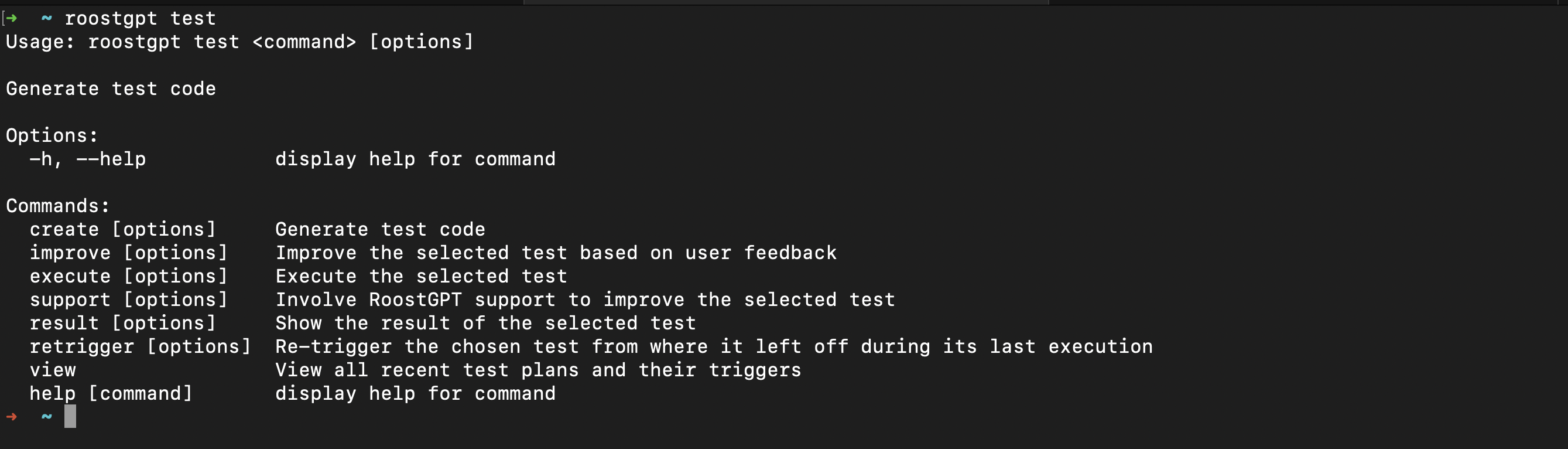
The roostgpt test command exposes the following subcommands:
| Subcommand | Description |
|---|---|
create | Generate tests for the configured source |
improve | Refine an existing test based on natural language feedback |
execute | Run a selected test |
support | Send logs for the selected trigger to the Roost team for analysis |
result | Select a past test run and view its full result dashboard |
retrigger | Select a test and re-run it from where it last stopped |
view | List all recent test triggers and their last-run timestamps |
Step 2: Create a .env Configuration File
The quickest way is to use the web form at app.roost.ai/gptCLIForm, which generates a pre-filled .env file ready to download.
Alternatively, create one manually:
# Roost license
ROOST_TOKEN=your_roost_token
ROOST_DOMAIN=app.roost.ai

# AI provider
AI_TYPE=openai
OPENAI_API_KEY=sk-...
OPENAI_API_MODEL=gpt-4o

# Git source
GIT_TYPE=github
SOURCE_GIT_TOKEN=ghp_...
SOURCE_OWNER_NAME=your-org
SOURCE_REPO_NAME=your-repo
SOURCE_BASE_BRANCH=main

# Test configuration
TEST_LANGUAGE=java
TEST_TYPE=unit
Get your Roost token from app.roost.ai → My Profile.
If any value contains the # character, wrap it in double quotes to prevent it being treated as a comment.
Example: SECRET_KEY="my#secret#key"
See the Full .env Template below for all supported variables.
Step 3: Generate Your First Test
Run from the directory containing your .env file:
roostgpt test create
Or specify a config file explicitly:
roostgpt test create -c path/to/test.env
RoostGPT reads the configuration, connects to your repository, calls the AI model, generates test files, and opens a Pull Request if Git output is configured.
Step 4: Review the Results
Once generation completes, RoostGPT displays a full result dashboard in the terminal.
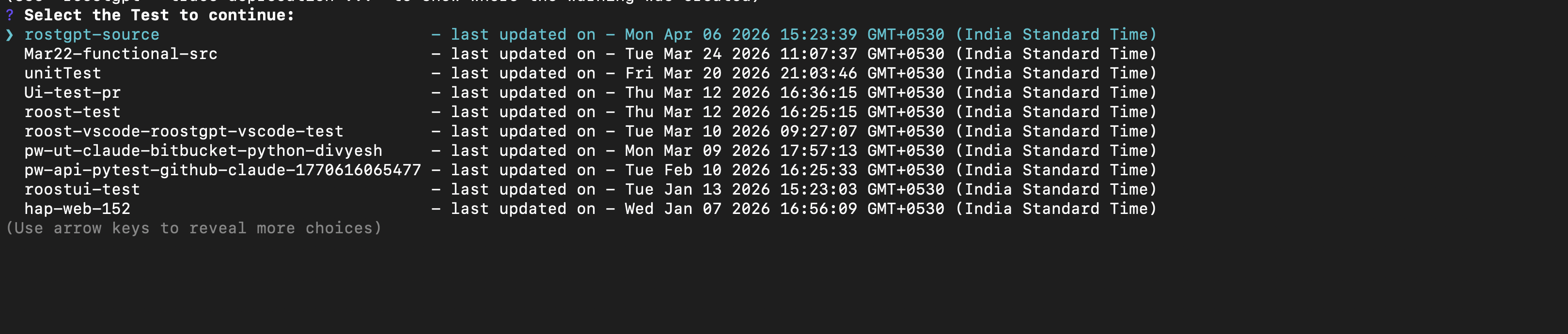
To revisit results, retrigger, or inspect a past run, use result, retrigger, or view — each prompts you to select from your recent test suites using the arrow keys:
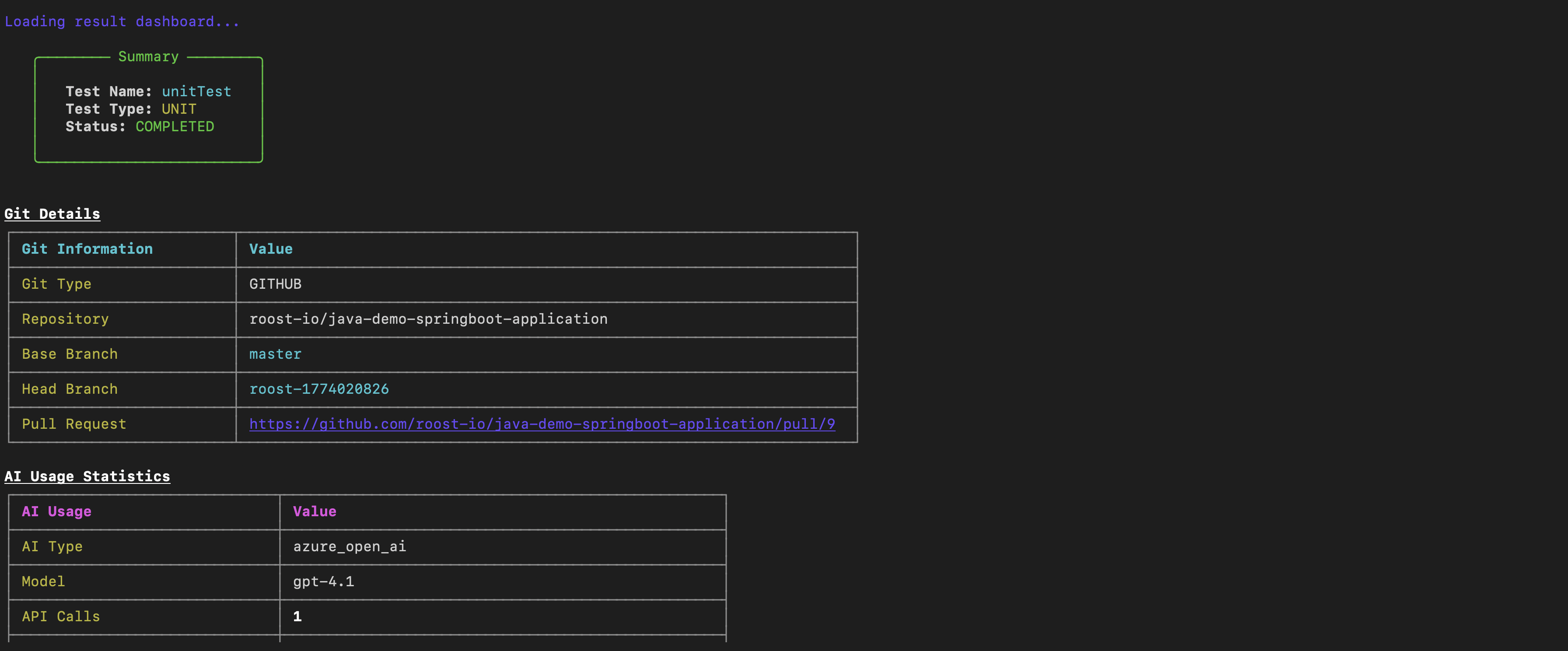
The dashboard contains five sections:
Summary — High-level outcome of the run.
| Field | Description |
|---|---|
| Test Name | Name of the test suite |
| Test Type | Type of tests generated (e.g. Unit) |
| Status | COMPLETED, FAILED, or IN_PROGRESS |
Test Metrics — Detailed coverage and quality statistics.
| Metric | Description |
|---|---|
| Methods Scanned | Total methods analysed |
| Methods Successful | Methods for which tests were generated successfully |
| Files Scanned / Total Files | Source files processed |
| Total Test Files | Number of test files written |
| Successful Tests | Tests that compiled and passed |
| Compilation Errors | Tests that failed to compile |
| Runtime Errors | Tests that compiled but failed at runtime |
| Skipped Methods | Methods excluded from generation |
Generated Files — Per-source-file breakdown listing each method with a ✔ (success) or ❌ (failure) status and the path of the generated test file.
Configuration — The full set of parameters used for the run: test type, language, framework, build tool, packages, functions, and verification settings.
Git Details — Repository, base branch, head branch, and Pull Request URL.
AI Usage Statistics — Provider, model, and total API call count.
Open the Pull Request URL to review and merge the generated tests into your repository.
CLI Command Reference
Run roostgpt (macOS/Linux) or ./roostGPT-win.exe (Windows).
| Command | Description |
|---|---|
roostgpt -h | Display help and available options |
roostgpt version update | Update the RoostGPT binary to the latest version |
roostgpt config create | Create a new configuration (.env) file |
roostgpt config update | Update an existing configuration file |
roostgpt test create | Trigger test generation |
roostgpt test improve | Improve a selected test based on user feedback |
roostgpt test retrigger | Re-trigger a test from where it left off |
roostgpt test support | Send logs to RoostGPT support for analysis |
roostgpt test execute | Execute a selected test |
roostgpt test view | View all recent test plans and their triggers |
roostgpt analysis | Analyse existing tests and generate a report |
Command Options
roostgpt config create
--output-dir, -o <path>— Create config file in a specific directory (default: current directory)--name <name>— Config file name (default:default.env)
roostgpt config update
--config, -c <path>— Path to the config file--name <name>— Load<name>.envfrom the current directory (ignored if--configis provided)
roostgpt test create
--config, -c <path>— Path to config file (default:./default.env)--docker, -d— Generate tests inside a Docker environment--verbose, -v— Enable verbose/debug logging--interactive, -i— Enable interactive mode
roostgpt test improve
--docker, -d— Improve tests in Docker--verbose, -v— Enable verbose logging--interactive, -i— Enable interactive mode
roostgpt test retrigger
--docker, -d— Re-trigger in Docker--verbose, -v— Enable verbose logging--interactive, -i— Enable interactive mode
roostgpt test support
--verbose, -v— Enable verbose logging
roostgpt test execute
--docker, -d— Execute in Docker--verbose, -v— Enable verbose logging--interactive, -i— Enable interactive mode
roostgpt analysis
--config, -c <path>— Path to config file--docker, -d— Run in Docker--verbose, -v— Enable verbose logging
Full .env Template
# GIT env vars
GIT_TYPE=                          # Default: github | Supports: github, gitlab, azure, bitbucket, local
HOSTED_TYPE=                       # Default: cloud | Supports: cloud, hosted
GIT_HOSTED_URL=                    # Required if HOSTED_TYPE=hosted
USE_SSH=                           # Optional; Default: false | Supports: true, false; SSH-based auth for Git
LOCAL_PROJECT_PATH=                # Required if GIT_TYPE=local; path to your workspace
SOURCE_GIT_CLONE_URL=              # Optional; the source repo clone URL
SOURCE_GIT_TOKEN=                  # Required
SOURCE_OWNER_NAME=                 # Required
SOURCE_REPO_NAME=                  # Required
SOURCE_REPO_ID=                    # Required for GIT_TYPE=gitlab
SOURCE_PROJECT_NAME=               # Required for GIT_TYPE=azure
SOURCE_PROJECT_ID=                 # Required for GIT_TYPE=bitbucket
SOURCE_BASE_BRANCH=                # Required
SOURCE_RELATIVE_DIRECTORY=         # Optional; relative path within the repository
SAME_TARGET_DETAIL=                # Optional; Default: true | Supports: true, false
DESTINATION_GIT_CLONE_URL=         # Optional; the destination repo clone URL
DESTINATION_GIT_TOKEN=             # Required if SAME_TARGET_DETAIL=false
DESTINATION_OWNER_NAME=            # Required if SAME_TARGET_DETAIL=false
DESTINATION_REPO_NAME=             # Required if SAME_TARGET_DETAIL=false
DESTINATION_REPO_ID=               # Required if SAME_TARGET_DETAIL=false and GIT_TYPE=gitlab
DESTINATION_PROJECT_NAME=          # Required for GIT_TYPE=azure
DESTINATION_PROJECT_ID=            # Required if SAME_TARGET_DETAIL=false and GIT_TYPE=bitbucket
DESTINATION_BASE_BRANCH=           # Required if SAME_TARGET_DETAIL=false
ENABLE_SECRET_SCANNING_BYPASS=     # Optional; Default: true | Supports: true, false; creates a bypass for push-protected secrets

# OpenAI env vars
OPENAI_API_MODEL=                  # Optional; Default: gpt-4
OPENAI_API_KEY=                    # Required if AI_TYPE=openai
OPENAI_BASE_URL=                   # Optional; Default: https://api.openai.com/v1

# Azure OpenAI env vars
AZURE_OPENAI_ENDPOINT=             # Required if AI_TYPE=azure_open_ai
AZURE_DEPLOYMENT_NAME=             # Required if AI_TYPE=azure_open_ai
AZURE_OPENAI_KEY=                  # Required if AI_TYPE=azure_open_ai (or use AZURE_USERNAME/PASSWORD)
AZURE_OPENAI_VERSION=              # Optional; Default: 2023-12-01-preview
AZURE_INFERENCE_AI=                # Optional; Default: false; set true if deployment is "Inference"
AZURE_USERNAME=                    # Required if AI_TYPE=azure_open_ai and AZURE_OPENAI_KEY is not set
AZURE_PASSWORD=                    # Required if AI_TYPE=azure_open_ai and AZURE_OPENAI_KEY is not set

# Open Source AI env vars
OPEN_SOURCE_MODEL_ENDPOINT=        # Required if AI_TYPE=open_source_ai
OPEN_SOURCE_MODEL=                 # Optional | Supports: meta-llama/Llama-2-13b-chat, HuggingFaceH4/starchat-beta

# SageMaker env vars
SAGEMAKER_MODEL_ENDPOINT=          # Required if AI_TYPE=sagemaker_model

# Claude AI env vars
CLAUDE_AI_MODEL=                   # Required if AI_TYPE=claude_ai
CLAUDE_AI_API_KEY=                 # Required if AI_TYPE=claude_ai

# AWS Bedrock env vars
AWS_BEDROCK_MODEL=                 # Required if AI_TYPE=bedrock_ai
AWS_DEFAULT_REGION=                # Required if AI_TYPE=bedrock_ai
AWS_ACCESS_KEY_ID=                 # Required if AI_TYPE=bedrock_ai
AWS_SECRET_ACCESS_KEY=             # Required if AI_TYPE=bedrock_ai
AWS_SESSION_TOKEN=                 # Optional; AWS session token
KNOWLEDGE_BASE_ID=                 # Required if using AWS Bedrock Knowledge Base

# DBRX AI env vars
DBRX_MODEL_ENDPOINT=               # Required if AI_TYPE=dbrx
DBRX_AUTH_TOKEN=                   # Required if AI_TYPE=dbrx
DBRX_MODEL_NAME=                   # Required if AI_TYPE=dbrx

# Gemini AI env vars
GEMINI_API_KEY=                    # Required if AI_TYPE=gemini
GEMINI_MODEL=                      # Required if AI_TYPE=gemini (e.g. gemini-2.5-pro, gemini-2.5-flash)

# Advanced AI env vars
AI_TEMPERATURE=                    # Optional; Default: 0.6
USE_ASSISTANT=                     # Optional; Default: false; use Assistant feature in OpenAI

# Jira board env vars
JIRA_HOST_NAME=                    # Required if TEST_TYPE=functional and BOARD_TYPE=jira
JIRA_EMAIL=                        # Required if TEST_TYPE=functional and BOARD_TYPE=jira
JIRA_TOKEN=                        # Required if TEST_TYPE=functional and BOARD_TYPE=jira
JIRA_ID=                           # Optional if TEST_TYPE=functional and BOARD_TYPE=jira

# Azure board env vars
AZURE_ORG=                         # Required if TEST_TYPE=functional and BOARD_TYPE=azure
AZURE_PROJECT=                     # Required if TEST_TYPE=functional and BOARD_TYPE=azure
AZURE_TOKEN=                       # Required if TEST_TYPE=functional and BOARD_TYPE=azure
AZURE_WORK_ITEM_ID=                # Optional if TEST_TYPE=functional and BOARD_TYPE=azure

# Advanced Jira/Azure board env vars
CREATE_API_SPEC=                   # Optional; used for TEST_TYPE=functional

# Log env vars
LOG_SOURCE=                        # Optional; Default: elks
LOG_SOURCE_PATH=                   # Optional; the log file path
LOG_FILE_ENCODING=                 # Optional; Default: utf-8 | Supports: utf-8, utf-16le
LOG_ELASTICSEARCH_URL=             # Optional; Elasticsearch URL
LOG_ELASTICSEARCH_USER=            # Optional; Elasticsearch username
LOG_ELASTICSEARCH_TOKEN=           # Optional; Elasticsearch token
LOG_ELASTICSEARCH_API_KEY=         # Optional; Elasticsearch API key

# Behavioural test env vars
BEHAVIORAL_TEST_TYPE=              # Optional | Supports: gherkin
BEHAVIORAL_TEST_SOURCE=            # Optional | Supports: file, gitpath, url
BEHAVIORAL_TEST_FILE_PATH=         # Optional; path of source file if source is file/gitpath (relative path for gitpath)
BEHAVIORAL_TEST_URL=               # Optional; URL of source file if source is url

# API Spec env vars
API_SPEC_TYPE=                     # Optional | Supports: swagger, postman, raml
API_SPEC_SOURCE=                   # Optional | Supports: file, gitpath, url
API_SPEC_FILE_PATH=                # Optional; path of source file if source is file/gitpath (relative path for gitpath)
API_SPEC_URL=                      # Optional; URL of source file if source is url
API_SPEC_ALIAS=                    # Optional

# Proto Spec env vars
PROTO_SPEC_SOURCE=                 # Optional | Supports: file, gitpath, url, gitrepo
PROTO_SPEC_FILE_PATH=              # Optional; path of source file if source is file/gitpath (relative path for gitpath)
PROTO_SPEC_URL=                    # Optional; URL of source file if source is url
PROTO_SPEC_GIT_BRANCH=             # Required if PROTO_SPEC_SOURCE=gitrepo; branch of proto file repo
PROTO_SPEC_REPO_NAME=              # Required if PROTO_SPEC_SOURCE=gitrepo; repo name of proto file
PROTO_SPEC_REPO_ID=                # Required if GIT_TYPE=gitlab
PROTO_SPEC_PROJECT_NAME=           # Required for GIT_TYPE=azure
PROTO_SPEC_PROJECT_ID=             # Required for GIT_TYPE=bitbucket
PROTO_SPEC_GIT_REPO_URL=           # Optional; the proto repo clone URL

# Image-based test env vars
SCREENSHOTS_SOURCE=                # Optional; used for image-based test generation | Supports: file, gitpath, url
SCREENSHOTS_URL=                   # Optional; URL of source file if source is url
SCREENSHOTS_FILE_PATH=             # Optional; path of source file if source is file/gitpath (relative path for gitpath)
HTTP_VERBS_FOR_TESTING=            # Optional; Default: get,post,put,patch,delete; comma-separated HTTP methods to test
REGEX_HTTP_ENDPOINTS_FOR_TESTING=  # Optional; regex to filter which endpoints are tested; if empty, all endpoints are tested

# Application test env vars
APPLICATION_ENTRYPOINT=            # Required if generating application tests alongside unit tests; relative path from project root (GPT-4-turbo only)

# License env vars
ROOST_DOMAIN=                      # Optional; Default: app.roost.ai
ROOST_TOKEN=                       # Optional; Roost token or license file path; default: $HOME/.roost/license.ral
TELEMETRY=                         # Optional; Default: true | Supports: true, false; no private information is shared

# Network security and API configuration env vars
SSL_VERIFY=                        # Optional; Default: true | Supports: true, false; set false to disable SSL certificate verification (trusted environments only)
API_REQUEST_TIMEOUT=               # Optional; Default: 0 (no timeout); value in milliseconds (e.g. 30000 for 30s)
HTTPS_AGENT_OPTIONS=               # Optional; JSON string with custom HTTPS agent options; e.g. {"ca":"/path/to/ca.pem","timeout":5000,"keepAlive":true}
LLM_HTTPS_AGENT_OPTIONS=           # Optional; JSON string with custom HTTPS agent options for LLM API calls in RoostUITestGenerator
API_CUSTOM_CONFIG=                 # Optional; JSON string with custom API configuration; e.g. {"headers":{"X-API-Key":"secret"},"queryParams":{"format":"json"}}

# Additional env vars
TEST_NAME=                         # Optional; Default: roost_test
ROOST_DIR=                         # Optional; Default: /var/tmp/Roost/RoostGPT
TEST_LANGUAGE=                     # Optional; Default: java | Supports: java, go, python, csharp
AI_TYPE=                           # Optional; Default: openai | Supports: openai, vertexai, gemini, azure_open_ai, open_source_ai, sagemaker_model, claude_ai, dbrx, bedrock_ai
JAVA_BUILD_TOOL=                   # Optional; Default: maven | Supports: maven, gradle
PACKAGES_TO_SCAN=                  # Optional; Default: *; Java only; comma-separated package names (e.g. "com.demo.sample,com.example.products")
ITERATION=                         # Optional; Default: 1; requires VERIFY_TEST=true
TIMEOUT=                           # Optional; Default: 1 hour
TEST_TYPE=                         # Optional; Default: unit | Supports: unit, functional, ui-test, api-spec-test
TEST_FRAMEWORK=                    # Optional; auto-detected by language | Supports: pytest, unittest (Python); gotest (Go); JUnit4, JUnit5 (Java); nunit (C#); jest (Node.js); postman, artillery, rest-assured, karate, playwright (api-spec-test)
TRIGGER_ID=                        # Optional; unique ID to identify multiple triggers; default: epoch timestamp
BOARD_TYPE=                        # Optional; Default: jira | Supports: jira, azure, none
MAX_DEPTH=                         # Optional; Default: -1 (traverse all subdirectories)
FUNCTIONS_TO_TEST=                 # Optional; comma-separated function names to test (format: module.[class.]method)
USE_CACHE=                         # Optional; Default: true | Supports: true, false
VERIFY_TEST=                       # Optional; Default: false | Supports: true, false
VULNERABILITY_GEN=                 # Optional; Default: false | Supports: true, false
CONSIDER_EXISTING_TEST=            # Optional; Default: true | Supports: true, false; scans repo for existing tests and incorporates them
GRADING_NOTES=                     # Optional; Default: true
CUSTOM_TAGS=                       # Optional; tags to attach to test code for tag-based test execution
ROOST_USER_INPUT=                  # Optional; free-text input used to guide test generation
ROOST_USER_INPUT_TYPE=             # Optional; Supports: file, text
ROOST_USER_INPUT_FILE=             # Required if ROOST_USER_INPUT_TYPE=file; path to input file (.docx, .pdf, .txt)
ROOST_USER_INPUT_FILTER=           # Optional; filter applied to user input
ONE_TEST_FILE_PER_SOURCEFILE=      # Optional; Go only; generate a single test file per source file
DATA_SET_COUNT=                    # Optional; Default: 15; number of desired test cases
DATA_SET_COUNT_PER_REQUEST=        # Optional; Default: 5; used for functional test to limit scenario count per HTTP request
PROJECT_ID=                        # Optional; used for TEST_TYPE=functional; unique project identifier; default: timestamp-based ID
NON_FUNCTIONAL_REQUIREMENTS=       # Optional; used for TEST_TYPE=functional | Supports: performance, security, scalability, compliance, usability, reliability
API_TEST_SERVER_CONFIG=            # Optional; Default: []; used for TEST_FRAMEWORK=karate

# Improve test env vars
FILE_PATH=                         # Required if IMPROVE_TEST=true; path to the test file to improve
USER_CONTENT=                      # Required if IMPROVE_TEST=true; natural language instructions for improvement
TESTSCRIPT_ENDPOINT=               # Required if IMPROVE_TEST=true and TEST_FRAMEWORK=postman

# Language version env vars (Docker mode only)
JAVA_VERSION=                      # Optional; Default: 17; used for JUnit4, JUnit5, karate, rest-assured
MAVEN_VERSION=                     # Optional; Default: 3.8.6; used for JUnit4, JUnit5, karate, rest-assured
GRADLE_VERSION=                    # Optional; Default: 8.6; used for JUnit4, JUnit5, karate, rest-assured
GO_VERSION=                        # Optional; Default: 1.19.9; used for gotest
PYTHON_VERSION=                    # Optional; Default: 3; used for pytest, unittest
DOTNET_VERSION=                    # Optional; Default: 8; used for nunit
NODE_VERSION=                      # Optional; Default: 18.18.0; used for artillery, postman, rest-assured, karate, jest, mocha
KARATE_VERSION=                    # Optional; Default: 1.5.1; used for TEST_FRAMEWORK=karate
USER_LANGUAGE=                     # Optional; Default: English; language for output and reports (supports 21+ languages including RTL scripts)

# Test runner env vars
TARGET_URL=                        # Required if TEST_EXECUTOR=true
STATUS_CODE=                       # Optional; Default: 200
ARRIVAL_RATE=                      # Optional; Default: 1
JSON_PATH=                         # Optional; auto-filled during test execution
MAVEN_BUILD_ARGS=                  # Optional; additional Maven build arguments (space-separated); e.g. "-DskipTests -Dspring-javaformat.skip=true"
EXECUTION_ENV_CONFIG=              # Optional; environment config used at test execution time; e.g. '{"AWS_PROFILE":"alpha","AWS_REGION":"beta"}'
ROOST_RESERVED_KEYWORDS=           # Optional; comma or newline-separated words to filter from prompts; or use <fileName> for file-based input

# Image processing env vars
EXCLUDE_IMAGES=                    # Optional; Default: false; set true to skip image processing from documents
TEXT_FROM_IMAGE=                   # Optional; set true (with EXCLUDE_IMAGES=false) for AI-based image text extraction; set false to send base64-encoded image for document processing
Environment Variable Reference
Git Variables
| Variable | Default | Required | Description |
|---|---|---|---|
GIT_TYPE | github | Optional | Git platform: github, gitlab, azure, bitbucket, local |
HOSTED_TYPE | cloud | Optional | Hosting type: cloud, hosted |
GIT_HOSTED_URL | If HOSTED_TYPE=hosted | URL of self-hosted Git instance | |
USE_SSH | false | Optional | Use SSH-based Git authentication |
LOCAL_PROJECT_PATH | If GIT_TYPE=local | Path to local workspace | |
SOURCE_GIT_CLONE_URL | Optional | Source repo clone URL | |
SOURCE_GIT_TOKEN | Required | Git token for source repo | |
SOURCE_OWNER_NAME | Required | Git username of source repo owner | |
SOURCE_REPO_NAME | Required | Source repository name | |
SOURCE_REPO_ID | If GIT_TYPE=gitlab | Source repo ID | |
SOURCE_PROJECT_NAME | If GIT_TYPE=azure | Azure DevOps project name | |
SOURCE_PROJECT_ID | If GIT_TYPE=bitbucket | Bitbucket project ID | |
SOURCE_BASE_BRANCH | Required | Base branch to generate tests for | |
SOURCE_RELATIVE_DIRECTORY | Optional | Relative path within the repository | |
SAME_TARGET_DETAIL | true | Optional | Push tests to the same repo as source |
DESTINATION_GIT_CLONE_URL | Optional | Destination repo clone URL | |
DESTINATION_GIT_TOKEN | If SAME_TARGET_DETAIL=false | Token for destination repo | |
DESTINATION_OWNER_NAME | If SAME_TARGET_DETAIL=false | Destination repo owner | |
DESTINATION_REPO_NAME | If SAME_TARGET_DETAIL=false | Destination repo name | |
DESTINATION_REPO_ID | If SAME_TARGET_DETAIL=false and GIT_TYPE=gitlab | Destination repo ID | |
DESTINATION_PROJECT_NAME | If GIT_TYPE=azure | Azure DevOps destination project name | |
DESTINATION_PROJECT_ID | If SAME_TARGET_DETAIL=false and GIT_TYPE=bitbucket | Destination project ID | |
DESTINATION_BASE_BRANCH | If SAME_TARGET_DETAIL=false | Branch to push generated tests to | |
ENABLE_SECRET_SCANNING_BYPASS | true | Optional | Create a bypass for push-protected secrets |
AI Provider Variables
| Variable | Required | Description |
|---|---|---|
AI_TYPE | Optional | AI provider (default: openai): openai, vertexai, gemini, azure_open_ai, claude_ai, bedrock_ai, dbrx, open_source_ai, sagemaker_model |
OPENAI_API_KEY | If AI_TYPE=openai | OpenAI API key |
OPENAI_API_MODEL | Optional | Model name (default: gpt-4) |
OPENAI_BASE_URL | Optional | API base URL (default: https://api.openai.com/v1) |
AZURE_OPENAI_ENDPOINT | If AI_TYPE=azure_open_ai | Azure OpenAI endpoint URL |
AZURE_DEPLOYMENT_NAME | If AI_TYPE=azure_open_ai | Azure deployment name |
AZURE_OPENAI_KEY | If AI_TYPE=azure_open_ai | Azure OpenAI API key (or use AZURE_USERNAME/AZURE_PASSWORD) |
AZURE_OPENAI_VERSION | Optional | API version (default: 2023-12-01-preview) |
AZURE_INFERENCE_AI | Optional | Set true if deployment type is "Inference" (default: false) |
AZURE_USERNAME | If no AZURE_OPENAI_KEY | Azure username for alternate auth |
AZURE_PASSWORD | If no AZURE_OPENAI_KEY | Azure password for alternate auth |
CLAUDE_AI_MODEL | If AI_TYPE=claude_ai | Claude model ID |
CLAUDE_AI_API_KEY | If AI_TYPE=claude_ai | Anthropic API key |
AWS_BEDROCK_MODEL | If AI_TYPE=bedrock_ai | Bedrock model ID |
AWS_DEFAULT_REGION | If AI_TYPE=bedrock_ai | AWS region |
AWS_ACCESS_KEY_ID | If AI_TYPE=bedrock_ai | AWS access key ID |
AWS_SECRET_ACCESS_KEY | If AI_TYPE=bedrock_ai | AWS secret access key |
AWS_SESSION_TOKEN | Optional | AWS session token (temporary credentials) |
AWS_BEDROCK_MODEL_TYPE | Optional | Inference profile type: foundation, cross-region |
KNOWLEDGE_BASE_ID | If using Bedrock Knowledge Base | AWS Bedrock Knowledge Base ID |
VERTEX_PROJECT_ID | If AI_TYPE=vertexai | Google Cloud project ID |
VERTEX_MODEL | If AI_TYPE=vertexai | Vertex model: text-bison, code-bison, codechat-bison, gemini-pro, etc. |
VERTEX_CREDENTIAL_TYPE | If AI_TYPE=vertexai | file or token |
VERTEX_BEARER_TOKEN | If VERTEX_CREDENTIAL_TYPE=token | Bearer token |
VERTEX_SERVICE_ACCOUNT_KEY | If VERTEX_CREDENTIAL_TYPE=file | Path to service account key JSON |
VERTEX_FINE_TUNE | Optional | Enable fine-tuning (default: false) |
VERTEX_REGION | If VERTEX_FINE_TUNE=true | Google Cloud region |
GEMINI_API_KEY | If AI_TYPE=gemini | Google Gemini API key |
GEMINI_MODEL | If AI_TYPE=gemini | Gemini model: gemini-2.5-pro, gemini-2.5-flash |
DBRX_MODEL_ENDPOINT | If AI_TYPE=dbrx | DBRX model endpoint URL |
DBRX_AUTH_TOKEN | If AI_TYPE=dbrx | DBRX auth token |
DBRX_MODEL_NAME | If AI_TYPE=dbrx | DBRX model name |
OPEN_SOURCE_MODEL_ENDPOINT | If AI_TYPE=open_source_ai | Open source model endpoint |
OPEN_SOURCE_MODEL | Optional | Model: meta-llama/Llama-2-13b-chat, HuggingFaceH4/starchat-beta |
SAGEMAKER_MODEL_ENDPOINT | If AI_TYPE=sagemaker_model | SageMaker endpoint URL |
AI_TEMPERATURE | Optional | AI creativity level (default: 0.6, range: 0.0–1.0) |
USE_ASSISTANT | Optional | Use Assistant feature in OpenAI (default: false) |
Test Configuration Variables
| Variable | Default | Description |
|---|---|---|
TEST_TYPE | unit | Test type: unit, functional, ui-test, api-spec-test |
TEST_FRAMEWORK | auto-detected | Framework per language — see template comments for full list |
TEST_LANGUAGE | java | Source language: java, go, python, csharp |
JAVA_BUILD_TOOL | maven | Java build tool: maven, gradle |
PACKAGES_TO_SCAN | * | Java packages to scan (comma-separated) |
FUNCTIONS_TO_TEST | Specific functions to test (comma-separated, format: module.[class.]method) | |
TEST_NAME | roost_test | Name for this test run |
TRIGGER_ID | epoch timestamp | Unique ID to identify multiple triggers |
ITERATION | 1 | Improve iterations when VERIFY_TEST=true |
TIMEOUT | 1 | Test generation timeout in hours |
MAX_DEPTH | -1 | Directory traversal depth (-1 = unlimited) |
VERIFY_TEST | false | Compile and run generated tests to verify they pass |
CONSIDER_EXISTING_TEST | true | Scan repo for existing tests and incorporate them |
VULNERABILITY_GEN | false | Generate vulnerability tests |
BOARD_TYPE | jira | Issue tracker: jira, azure, none |
DATA_SET_COUNT | 15 | Number of desired test cases |
DATA_SET_COUNT_PER_REQUEST | 5 | Functional test: max scenario count per HTTP request |
PROJECT_ID | timestamp | Functional test: unique project identifier |
NON_FUNCTIONAL_REQUIREMENTS | Functional test types: performance, security, scalability, compliance, usability, reliability | |
ROOST_USER_INPUT | Free-text input to guide test generation | |
ROOST_USER_INPUT_TYPE | Input type: file or text | |
ROOST_USER_INPUT_FILE | If ROOST_USER_INPUT_TYPE=file — path to input file (.docx, .pdf, .txt) | |
ROOST_USER_INPUT_FILTER | Filter applied to user input | |
CUSTOM_TAGS | Tags to attach to test code for tag-based execution | |
ONE_TEST_FILE_PER_SOURCEFILE | Go only — generate one test file per source file | |
CREATE_API_SPEC | Used for TEST_TYPE=functional | |
ROOST_TOKEN | $HOME/.roost/license.ral | Roost license token or file path |
ROOST_DOMAIN | app.roost.ai | Roost API domain |
TELEMETRY | true | Send anonymous telemetry data to Roost |
Network Security and API Configuration
| Variable | Default | Description |
|---|---|---|
SSL_VERIFY | true | Verify SSL certificates for HTTPS requests; set false in trusted environments only |
API_REQUEST_TIMEOUT | 0 | HTTP/HTTPS request timeout in milliseconds (0 = no timeout) |
HTTPS_AGENT_OPTIONS | JSON string with custom HTTPS agent options, e.g. {"ca":"/path/to/ca.pem","keepAlive":true} | |
LLM_HTTPS_AGENT_OPTIONS | JSON string with custom HTTPS agent options for LLM API calls in RoostUITestGenerator | |
API_CUSTOM_CONFIG | JSON string with custom API configuration (headers, path params, body params, query params) |
Improve Test Variables
| Variable | Required | Description |
|---|---|---|
FILE_PATH | If IMPROVE_TEST=true | Path to the test file to improve |
USER_CONTENT | If IMPROVE_TEST=true | Natural language instructions for improvement |
TESTSCRIPT_ENDPOINT | If IMPROVE_TEST=true and TEST_FRAMEWORK=postman | Endpoint for the test script |
Test Runner Variables
| Variable | Default | Description |
|---|---|---|
TARGET_URL | Required if TEST_EXECUTOR=true — URL to run tests against | |
STATUS_CODE | 200 | Expected HTTP status code |
ARRIVAL_RATE | 1 | Request arrival rate for load tests |
MAVEN_BUILD_ARGS | Additional Maven build arguments (space-separated string), e.g. "-DskipTests" | |
EXECUTION_ENV_CONFIG | JSON string of environment variables injected at execution time | |
ROOST_RESERVED_KEYWORDS | Comma or newline-separated words to filter from prompts; or <fileName> for file-based input |
Language Version Variables (Docker mode)
| Variable | Default | Applies to |
|---|---|---|
JAVA_VERSION | 17 | JUnit4, JUnit5, karate, rest-assured |
MAVEN_VERSION | 3.8.6 | JUnit4, JUnit5, karate, rest-assured |
GRADLE_VERSION | 8.6 | JUnit4, JUnit5, karate, rest-assured |
GO_VERSION | 1.19.9 | gotest |
PYTHON_VERSION | 3 | pytest, unittest |
DOTNET_VERSION | 8 | nunit |
NODE_VERSION | 18.18.0 | artillery, postman, rest-assured, karate, jest, mocha |
KARATE_VERSION | 1.5.1 | karate |
USER_LANGUAGE | English | Language for output and reports (21+ languages, including RTL scripts) |
Image Processing Variables
| Variable | Default | Description |
|---|---|---|
EXCLUDE_IMAGES | false | Set true to skip image processing from documents |
TEXT_FROM_IMAGE | Set true (with EXCLUDE_IMAGES=false) for AI-based image text extraction; set false to send base64-encoded images |