# AI Configuration and Tokens
# OpenAI
## Step-by-Step Token Generation
1. **Access API Keys Section**
- Log into OpenAI Platform
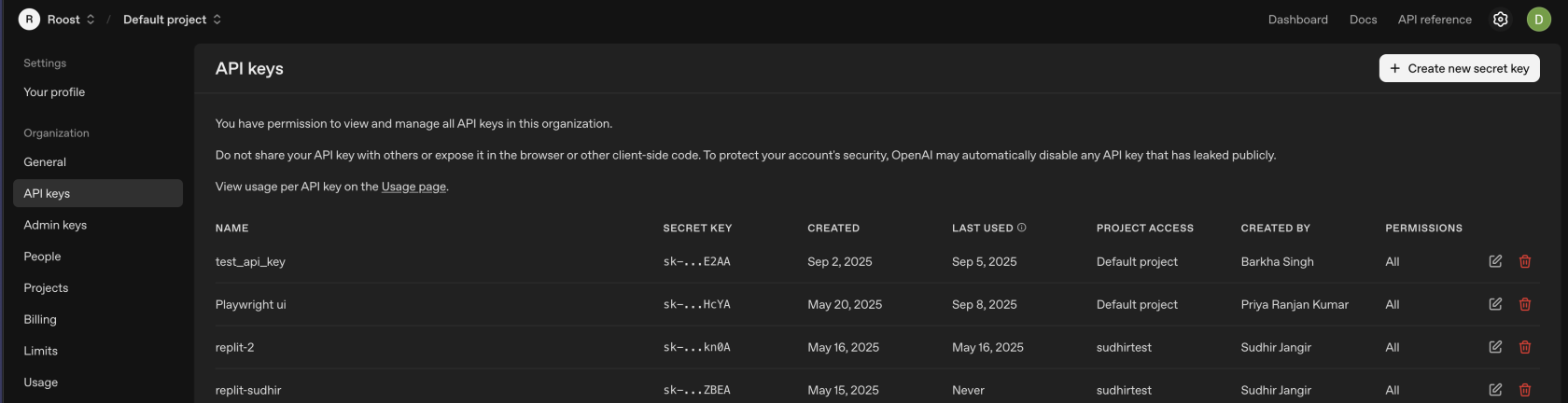
- Navigate to **API Keys** in the left sidebar
[](https://docs.roost.ai/uploads/images/gallery/2025-09/Xd4fEGq9FrDVnwui-screenshot-2025-09-08-at-11-55-40-am.png)
- Click **"Create new secret key"**
2. **Configure Key Settings**
- **Name**: Enter descriptive name (e.g., "RoostGPT Production")
- **Permissions**: Select "All"
- **Project**: Choose specific project (if using project-based organization)
- Click **"Create secret key"**
3. **Secure Key Storage**
- **Copy immediately**: Key shown only once
#### OpenAI Recommended Models for RoostGPT Integration
**GPT-4o** (Primary Recommended)
- **Model Name**: `gpt-4o`
- **Context Window**: 128K tokens
- **Pricing**: ~$2.50/1M input tokens, ~$10/1M output tokens
- **Best For**: **Primary choice** for all RoostGPT tasks - reliable, proven performance
- **Key Features**:
- Multimodal capabilities (text, images, code)
- Well-tested and stable in production
- Excellent code understanding and generation
- Strong performance across diverse tasks
- Widely adopted and documented
#### **GPT-5** (Advanced Alternative)
- **Model Name**: `gpt-5`
- **Context Window**: 272K tokens [GPT-5: Key characteristics, pricing and model card](https://simonwillison.net/2025/Aug/7/gpt-5/)
- **Pricing**: $1.25/1M input tokens, $10/1M output tokens [Introducing GPT‑5 for developers | OpenAI](https://openai.com/index/introducing-gpt-5-for-developers/)
- **Best For**: Complex reasoning tasks, advanced code analysis
- **Key Features**:
- Built-in reasoning capabilities [Introducing GPT-5 | OpenAI](https://openai.com/index/introducing-gpt-5/)
- Enhanced coding performance [Introducing GPT‑5 for developers | OpenAI](https://openai.com/index/introducing-gpt-5-for-developers/)
- Larger context window for complex codebases
- Latest generation technology
#### **GPT-4.1** (Balanced Option)
- **Model Name**: `gpt-4.1`
- **Context Window**: Similar to GPT-4o
- **Pricing**: Competitive with GPT-4o
- **Best For**: Enhanced performance when GPT-4o needs upgrade
- **Key Features**:
- Improved over GPT-4o baseline
- Good balance of cost and capability
- Reliable for standard development tasks
# Azure OpenAI
### Step-by-Step Token Generation
#### 1. **Create Azure OpenAI Resource**
- Log into [Azure Portal](https://portal.azure.com)
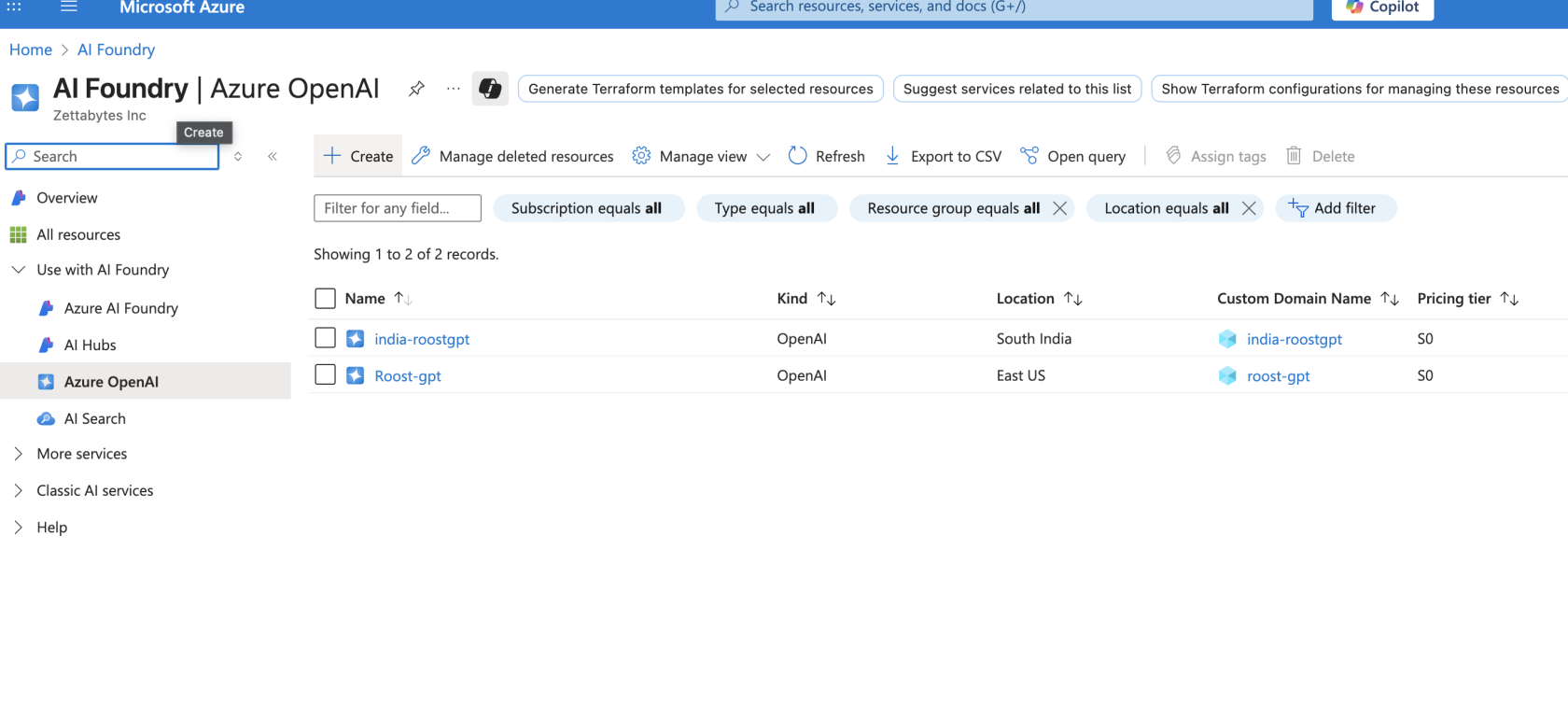
- Search for **"Azure OpenAI"** in the top search bar
- Click **"Create"** → **"Azure OpenAI"
[](https://docs.roost.ai/uploads/images/gallery/2025-09/AGYpc2rfJJgUKIrE-screenshot-2025-09-08-at-1-48-55-pm.png)**
- Configure:
- **Subscription**: Select your Azure subscription
- **Resource Group**: Create new or select existing
- **Region**: Choose supported region (e.g., East US, West Europe)
- **Name**: Enter unique name (e.g., "roostgpt-openai-prod")
- **Pricing Tier**: Select Standard S0
#### 2. **Deploy Models to Resource**
- Navigate to your created Azure OpenAI resource
- Go to **"Model deployments"** in the left sidebar
- Click **"Create new deployment"**
- Configure deployment:
- **Model**: Select model (e.g., gpt-4o)
- **Deployment name**: Enter name (e.g., "gpt-4o-deployment")
- **Model version**: Select latest version
- **Deployment type**: Standard
- Click **"Create"**
#### 3. **Access API Keys and Endpoint**
- In your Azure OpenAI resource, navigate to **"Keys and Endpoint"**
- Copy **KEY 1** or **KEY 2**
- Copy the **Endpoint URL** (format: `https://your-resource.openai.azure.com/`)
- **Important**: Store both key and endpoint securely
#### 4. **Secure Key Storage**
- **Copy immediately**: Keys are always visible but treat as sensitive
- Store endpoint URL and API key together
## Azure OpenAI Recommended Models for RoostGPT Integration
### **GPT-4o** (Primary Recommended)
- **Model Name**: `gpt-4o` (deployment name as configured)
- **Context Window**: 128K tokens
- **Pricing**: ~$2.50/1M input tokens, ~$10/1M output tokens
- **Deployment Required**: Yes - must deploy to your Azure resource
- **Best For**: **Primary choice** for all RoostGPT tasks - reliable, proven performance
- **Key Features**:
- Multimodal capabilities (text, images, code)
- Enterprise-grade security and compliance
- Data residency control
- Excellent code understanding and generation
- Integration with Azure ecosystem
### **GPT-4o-mini** (Cost-Effective Option)
- **Model Name**: `gpt-4o-mini` (deployment name as configured)
- **Context Window**: 128K tokens
- **Pricing**: ~$0.15/1M input tokens, ~$0.60/1M output tokens
- **Deployment Required**: Yes
- **Best For**: High-volume, cost-sensitive tasks
- **Key Features**:
- Significantly lower cost than GPT-4o
- Good performance for standard tasks
- Fast response times
- Suitable for basic test generation
# Claude AI
### Step-by-Step Token Generation
#### 1. **Create Anthropic Account**
- Visit [console.anthropic.com](https://console.anthropic.com)
- Click **"Sign Up"** or **"Get Started"**
- Complete registration with email verification
- Log into the Anthropic Console dashboard
#### 2. **Access API Keys Section**
- Navigate to **"API keys"** in the left sidebar
#### 3. **Create New API Key**
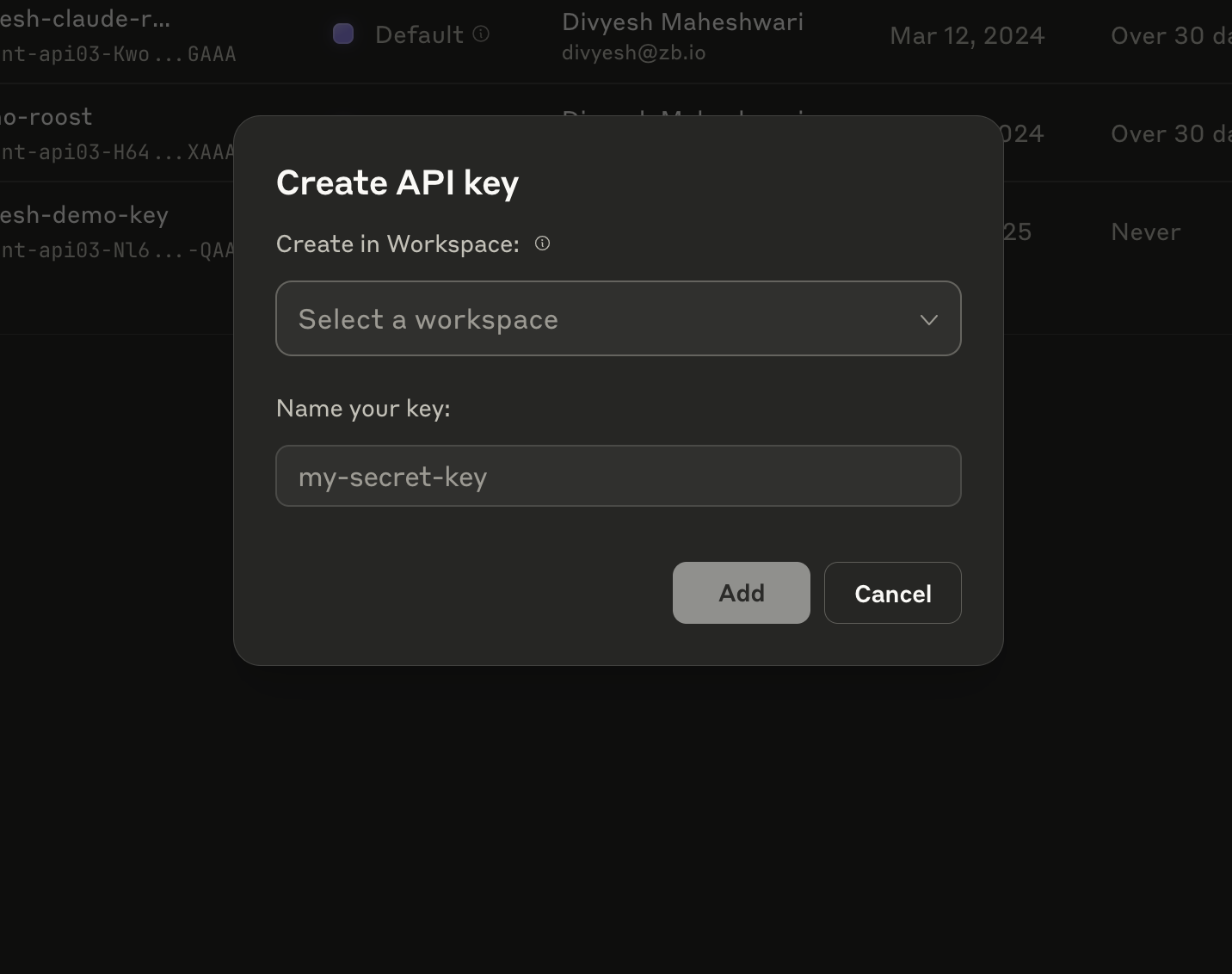
- Click the **"Create API key"** button (or similar)
- A dialog box will appear with two simple fields:
#### 4. **Configure Key Settings**
- **Create in Workspace**: Select your workspace from dropdown
- Choose "Default" or your specific workspace
- **Name your key**: Enter descriptive name
- Example: "RoostGPT-Production", "Testing-Environment", etc.
[](https://docs.roost.ai/uploads/images/gallery/2025-09/w3VmNg7oKQnpNKvO-screenshot-2025-09-08-at-2-04-39-pm.png)
- Click **"Add"** button
#### 5. **Secure Key Storage**
- **Copy immediately**: The full API key will be displayed once
- The key will start with `sk-ant-api03-` format
## Anthropic Claude Recommended Models for RoostGPT Integration
## **Claude Sonnet 4** (Primary Recommended)
- **Model Name**: `claude-sonnet-4-20250514`
- **Context Window**: 200K tokens (1M tokens available with beta header)
- **Max Output**: 64,000 tokens
- **Latency**: Fast
- **Training Data**: March 2025
- **Pricing**: $3/1M input tokens, $15/1M output tokens
- **Best For**: **Primary choice** for all RoostGPT tasks - optimal balance of performance, speed, and cost
- **Key Features**:
- High intelligence with balanced performance
- Extended thinking capabilities for complex reasoning
- Multimodal support (text and vision)
- Large output capacity ideal for comprehensive code generation
- Fast response times suitable for interactive development
## **Claude Opus 4.1** (Premium Alternative)
- **Model Name**: `claude-opus-4-1-20250805`
- **Context Window**: 200K tokens
- **Max Output**: 32,000 tokens
- **Latency**: Moderately Fast
- **Training Data**: March 2025
- **Pricing**: $15/1M input tokens, $75/1M output tokens
- **Best For**: Most demanding tasks requiring highest intelligence
- **Key Features**:
- Highest level of intelligence and capability
- Most advanced extended thinking capabilities
- Superior performance on complex engineering problems
- Latest training data (most recent model)
- Best choice for critical analysis and complex debugging
## **Claude Haiku 3.5** (Speed & Cost Optimized)
- **Model Name**: `claude-3-5-haiku-20241022`
- **Context Window**: 200K tokens
- **Max Output**: 8,192 tokens
- **Latency**: Fastest
- **Training Data**: July 2024
- **Pricing**: $0.25/1M input tokens, $1.25/1M output tokens
- **Best For**: High-volume, speed-critical tasks
- **Key Features**:
- Fastest response times in the Claude family
- Intelligence at blazing speeds
- Most cost-effective for bulk operations
- Multimodal capabilities maintained
- No extended thinking (optimized for speed)
# Google Vertex AI
# AWS Bedrock