AI Configuration and Tokens
This section covers the setup and configuration of AI model providers for RoostGPT. To leverage AI-powered test generation, code analysis, and intelligent suggestions, you'll need to configure API keys and tokens for your chosen AI providers. RoostGPT supports multiple AI providers, allowing you to choose the best models for your specific use cases and organizational requirements.
OpenAI
Step-by-Step Token Generation
- Access API Keys Section
- Log into OpenAI Platform
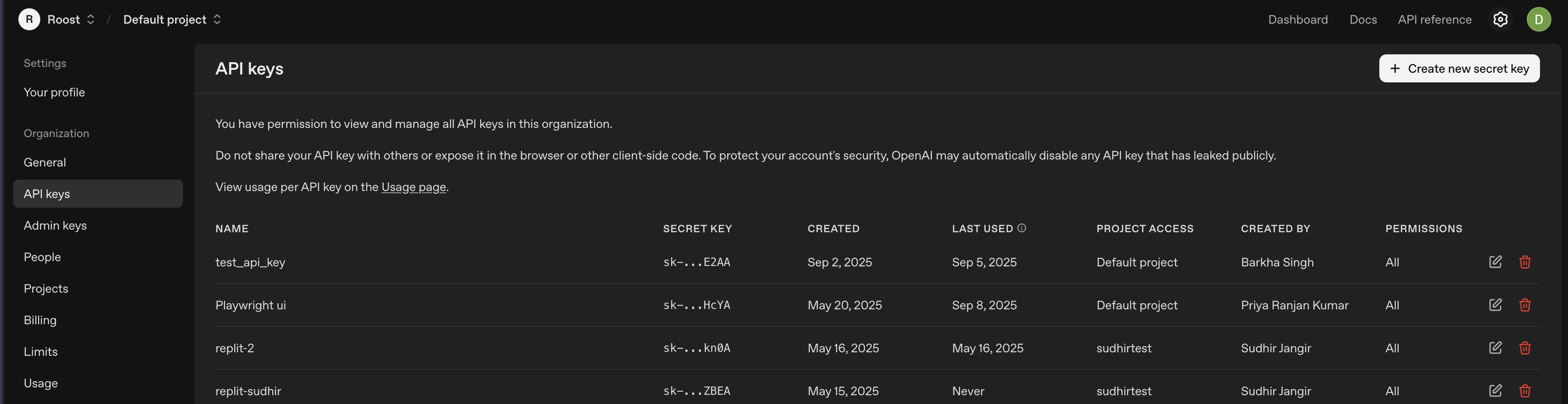
- Navigate to API Keys in the left sidebar

- Click "Create new secret key"
- Configure Key Settings
- Name: Enter descriptive name (e.g., "RoostGPT Production")
- Permissions: Select "All"
- Project: Choose specific project (if using project-based organization)
- Click "Create secret key"
- Secure Key Storage
- Copy immediately: Key shown only once
OpenAI Recommended Models for RoostGPT Integration
GPT-4o (Primary Recommended)
- Model Name:
gpt-4o - Context Window: 128K tokens
- Pricing: ~$2.50/1M input tokens, ~$10/1M output tokens
- Best For: Primary choice for all RoostGPT tasks - reliable, proven performance
- Key Features:
- Multimodal capabilities (text, images, code)
- Well-tested and stable in production
- Excellent code understanding and generation
- Strong performance across diverse tasks
- Widely adopted and documented
GPT-5 (Advanced Alternative)
- Model Name:
gpt-5 - Context Window: 272K tokens GPT-5: Key characteristics, pricing and model card
- Pricing: $1.25/1M input tokens, $10/1M output tokens Introducing GPT‑5 for developers | OpenAI
- Best For: Complex reasoning tasks, advanced code analysis
- Key Features:
- Built-in reasoning capabilities Introducing GPT-5 | OpenAI
- Enhanced coding performance Introducing GPT‑5 for developers | OpenAI
- Larger context window for complex codebases
- Latest generation technology
GPT-4.1 (Balanced Option)
- Model Name:
gpt-4.1 - Context Window: Similar to GPT-4o
- Pricing: Competitive with GPT-4o
- Best For: Enhanced performance when GPT-4o needs upgrade
- Key Features:
- Improved over GPT-4o baseline
- Good balance of cost and capability
- Reliable for standard development tasks
Azure OpenAI
Step-by-Step Token Generation
1. Create Azure OpenAI Resource
- Log into Azure Portal
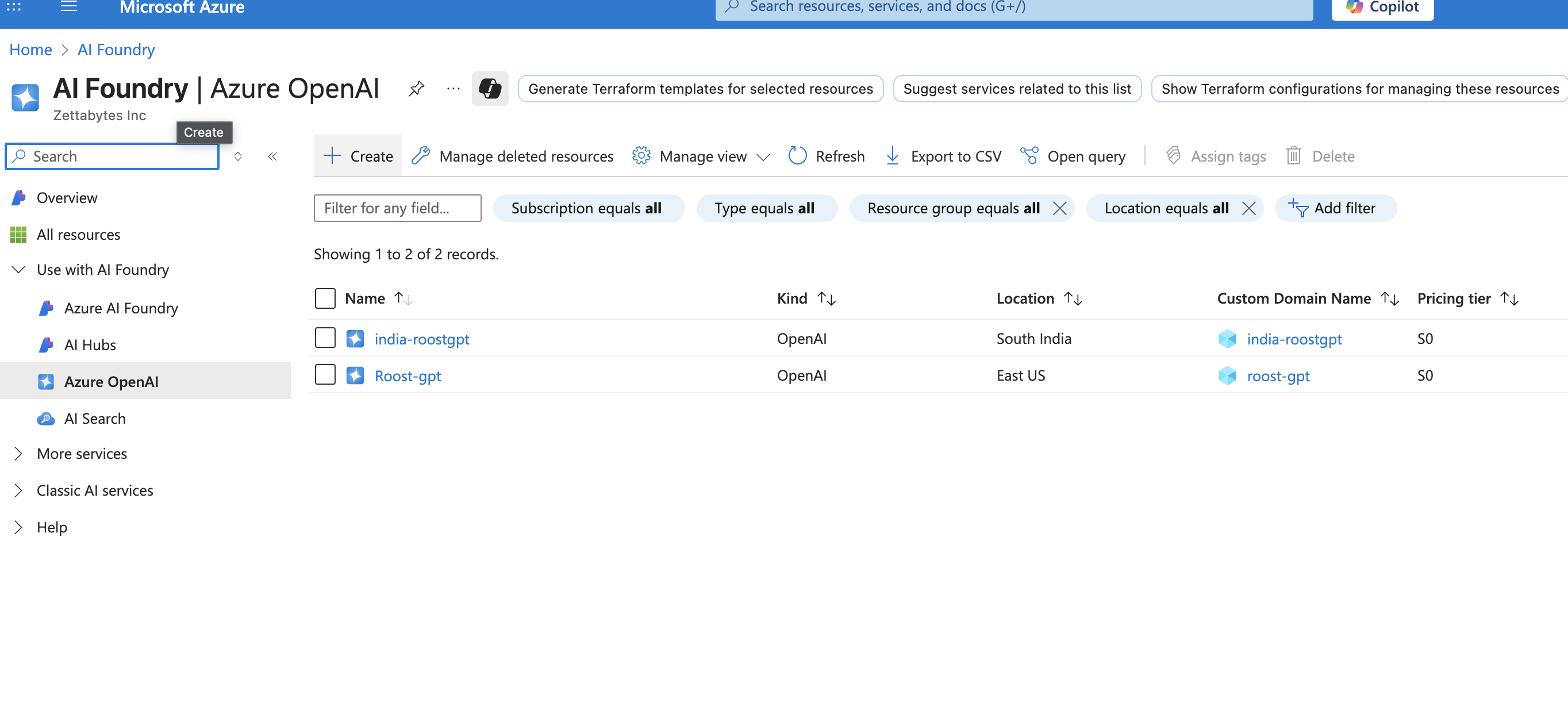
- Search for "Azure OpenAI" in the top search bar
- Click "Create" → "Azure OpenAI"

- Configure:
- Subscription: Select your Azure subscription
- Resource Group: Create new or select existing
- Region: Choose supported region (e.g., East US, West Europe)
- Name: Enter unique name (e.g., "roostgpt-openai-prod")
- Pricing Tier: Select Standard S0
2. Deploy Models to Resource
3. Access API Keys and Endpoint
- In your Azure OpenAI resource, navigate to "Keys and Endpoint"
- Copy KEY 1 or KEY 2
- Copy the Endpoint URL (format:
https://your-resource.openai.azure.com/) - Important: Store both key and endpoint securely
4. Secure Key Storage
- Copy immediately: Keys are always visible but treat as sensitive
- Store endpoint URL and API key together
Azure OpenAI Recommended Models for RoostGPT Integration
GPT-4o (Primary Recommended)
- Model Name:
gpt-4o(deployment name as configured) - Context Window: 128K tokens
- Pricing: ~$2.50/1M input tokens, ~$10/1M output tokens
- Deployment Required: Yes - must deploy to your Azure resource
- Best For: Primary choice for all RoostGPT tasks - reliable, proven performance
- Key Features:
- Multimodal capabilities (text, images, code)
- Enterprise-grade security and compliance
- Data residency control
- Excellent code understanding and generation
- Integration with Azure ecosystem
GPT-4o-mini (Cost-Effective Option)
- Model Name:
gpt-4o-mini(deployment name as configured) - Context Window: 128K tokens
- Pricing: ~$0.15/1M input tokens, ~$0.60/1M output tokens
- Deployment Required: Yes
- Best For: High-volume, cost-sensitive tasks
- Key Features:
- Significantly lower cost than GPT-4o
- Good performance for standard tasks
- Fast response times
- Suitable for basic test generation
Claude AI
Step-by-Step Token Generation
1. Create Anthropic Account
- Visit console.anthropic.com
- Click "Sign Up" or "Get Started"
- Complete registration with email verification
- Log into the Anthropic Console dashboard
2. Access API Keys Section
3. Create New API Key
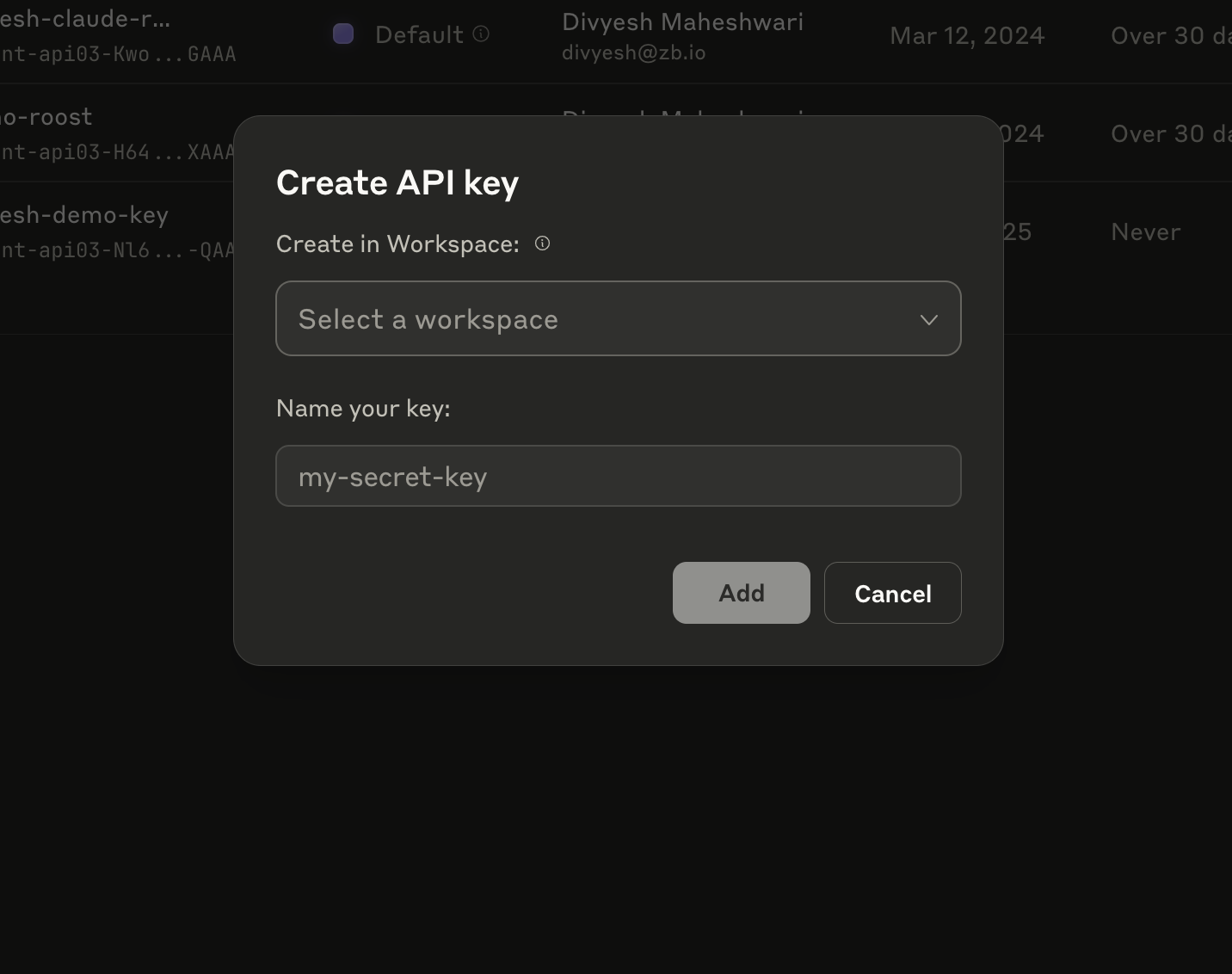
- Click the "Create API key" button (or similar)
- A dialog box will appear with two simple fields:
4. Configure Key Settings
- Create in Workspace: Select your workspace from dropdown
- Choose "Default" or your specific workspace
- Name your key: Enter descriptive name
- Example: "RoostGPT-Production", "Testing-Environment", etc.

- Example: "RoostGPT-Production", "Testing-Environment", etc.
- Click "Add" button
5. Secure Key Storage
- Copy immediately: The full API key will be displayed once
- The key will start with
sk-ant-api03-format
Anthropic Claude Recommended Models for RoostGPT Integration
Claude Sonnet 4 (Primary Recommended)
- Model Name:
claude-sonnet-4-20250514 - Context Window: 200K tokens (1M tokens available with beta header)
- Max Output: 64,000 tokens
- Latency: Fast
- Training Data: March 2025
- Pricing: $3/1M input tokens, $15/1M output tokens
- Best For: Primary choice for all RoostGPT tasks - optimal balance of performance, speed, and cost
- Key Features:
- High intelligence with balanced performance
- Extended thinking capabilities for complex reasoning
- Multimodal support (text and vision)
- Large output capacity ideal for comprehensive code generation
- Fast response times suitable for interactive development
Claude Opus 4.1 (Premium Alternative)
- Model Name:
claude-opus-4-1-20250805 - Context Window: 200K tokens
- Max Output: 32,000 tokens
- Latency: Moderately Fast
- Training Data: March 2025
- Pricing: $15/1M input tokens, $75/1M output tokens
- Best For: Most demanding tasks requiring highest intelligence
- Key Features:
- Highest level of intelligence and capability
- Most advanced extended thinking capabilities
- Superior performance on complex engineering problems
- Latest training data (most recent model)
- Best choice for critical analysis and complex debugging
Claude Haiku 3.5 (Speed & Cost Optimized)
- Model Name:
claude-3-5-haiku-20241022 - Context Window: 200K tokens
- Max Output: 8,192 tokens
- Latency: Fastest
- Training Data: July 2024
- Pricing: $0.25/1M input tokens, $1.25/1M output tokens
- Best For: High-volume, speed-critical tasks
- Key Features:
- Fastest response times in the Claude family
- Intelligence at blazing speeds
- Most cost-effective for bulk operations
- Multimodal capabilities maintained
- No extended thinking (optimized for speed)